






Excellent cosmetic condition - looks like new and saves you money.


Save money
Enjoy significant savings without compromising on quality.

Reduce waste
Reduce electronic waste and lower your carbon footprint.

Extensively Tested
Every refurbished device is rigorously tested and repaired by certified technicians.

Warranty included
This device is protected with a warranty covering both parts and labour.
Powerful Performance with Intel® Core™ i5-13420H
At the heart of the Lenovo V15 lies the robust Intel® Core™ i5-13420H processor, designed to keep up with your demanding workloads. With eight cores and high turbo boost capabilities, this processor is perfect for multitasking, content creation, and running productivity apps without lag. Whether you're working with spreadsheets, editing documents, or jumping on video calls, the V15 ensures smooth, responsive performance throughout the day.
Immersive 15.6" Full HD Display
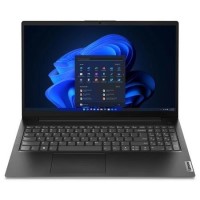
Enjoy crisp visuals and vibrant colors on the 39.6 cm (15.6") Full HD display. With a resolution of 1920 x 1080, the anti-glare screen delivers excellent clarity and sharpness, making it ideal for extended work sessions, media consumption, or streaming. The slim bezels around the display also contribute to a modern look while maximizing your viewing area.
Multitasking Made Easy with 16 GB DDR4 RAM
Equipped with 16 GB of DDR4-SDRAM, the Lenovo V15 allows for seamless multitasking between multiple apps, browser tabs, and software tools. This generous memory ensures that your workflow remains uninterrupted and efficient, even with resource-heavy applications running in the background.
Fast, Reliable Storage with 512 GB SSD
Boot up in seconds and experience faster file access with the 512 GB SSD. Solid-state drives provide significantly improved read/write speeds compared to traditional hard drives, resulting in quicker startups, shorter load times, and smoother overall performance. Plus, you’ll have ample space to store your documents, photos, videos, and essential software.
Seamless Connectivity with Wi-Fi 5
Stay connected with reliable wireless performance thanks to Wi-Fi 5 (802.11ac) support. Whether you're working from home, attending online meetings, or browsing on the go, the V15 ensures a stable and speedy internet connection. It also includes essential I/O ports for peripherals, external drives, and displays to enhance your productivity setup.
Business-Ready with Windows 11 Pro
Pre-installed with Windows 11 Pro, the Lenovo V15 offers enterprise-level features like BitLocker device encryption, remote desktop access, and advanced management tools. It’s built for professionals who need security, flexibility, and power to meet the demands of modern business environments.
Sleek and Professional Design
Finished in a classic black chassis, the Lenovo V15 combines functionality with professional style. Its slim profile makes it easy to carry between meetings or workspaces, while the durable build ensures it can handle daily use.