

















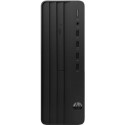



Excellent cosmetic condition - looks like new and saves you money.


Save money
Enjoy significant savings without compromising on quality.

Reduce waste
Reduce electronic waste and lower your carbon footprint.

Extensively tested
Every refurbished device is rigorously tested and repaired by certified technicians.
BSI Kitemark Certified
This device meets the BSI Kitemark™ certification standards, guaranteeing its quality and safety.

Warranty included
This device is protected with a warranty covering both parts and labour.
Powerful 8th Gen Intel® Core™ i7 Processor
At the heart of the HP ProDesk 400 G5 SFF is the 8th generation Intel® Core™ i7 processor, designed to handle demanding workloads with ease. Whether you're multitasking between spreadsheets, running enterprise-grade software, or working with large datasets, this desktop delivers consistently smooth and responsive performance. It’s ideal for professionals who require reliable power in a compact machine.
Compact and Space-Saving Small Form Factor Design
Engineered to fit seamlessly into modern workspaces, the small form factor (SFF) chassis of the HP ProDesk 400 G5 saves valuable desk space without compromising on functionality. Its sleek, professional appearance is matched with practical accessibility, making it suitable for offices, retail counters, or home workstations where space is at a premium.
Efficient Multitasking with 8GB RAM
With 8GB of high-speed RAM, this desktop enables efficient multitasking across multiple applications and browser tabs. You can move from one task to another with minimal lag, whether you're managing email, hosting virtual meetings, or performing data analysis. It strikes the right balance between productivity and performance for daily business operations.
Speed and Storage with 256GB SSD
The 256GB solid-state drive (SSD) offers fast boot-up times and snappy access to your files and programs. Compared to traditional hard drives, SSDs provide enhanced durability and dramatically faster data transfer speeds. You'll enjoy quicker system startups, reduced application load times, and ample space for essential files and software.
Built for Business with Windows 11 Pro
Pre-installed with Windows 11 Pro, the HP ProDesk 400 G5 is ready for business straight out of the box. Windows 11 Pro offers advanced security features, productivity tools, and compatibility with a broad range of professional software. Features like BitLocker encryption, Remote Desktop, and domain join support make it ideal for secure, enterprise-level IT environments.
When setting up your new unit you will need to activate your Microsoft License Key. Follow the simple step by step guide to find out how to do so, it is really quick and easy to do!
How to activate your Microsoft License Key »


