

















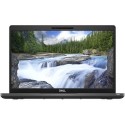



Excellent cosmetic condition - looks like new and saves you money.


Save money
Enjoy significant savings without compromising on quality.

Reduce waste
Reduce electronic waste and lower your carbon footprint.

Extensively tested
Every refurbished device is rigorously tested and repaired by certified technicians.
BSI Kitemark Certified
This device meets the BSI Kitemark™ certification standards, guaranteeing its quality and safety.

Warranty included
This device is protected with a warranty covering both parts and labour.
The Lenovo ThinkPad T490 is a business-class laptop that blends power, durability, and portability in a compact form. Engineered with the needs of professionals in mind, the T490 is ideal for those who demand reliable performance whether working in the office, on the go, or remotely. At just under 3.5 pounds and with a sleek 14-inch chassis, it offers the perfect balance of productivity and convenience.
Powerful 8th Gen Intel Core i7 Processor
At the heart of the T490 is the Intel Core i7 8th Generation processor, delivering impressive computing power and responsiveness. With multiple cores and hyper-threading support, it handles demanding tasks such as data analysis, multitasking, and software development with ease. Whether you're managing spreadsheets or running virtual machines, the i7 ensures smooth performance every time.
8GB RAM for Smooth Multitasking
Equipped with 8GB of DDR4 RAM, the T490 allows for efficient multitasking and faster application loading. This memory configuration supports common professional workloads such as document processing, multiple browser tabs, and light design or development tools. With upgradable RAM options, users can scale performance as their needs evolve over time.
256GB SSD for Fast, Secure Storage
A 256GB solid-state drive (SSD) provides speedy boot times, quick file access, and reliable data storage. SSDs are not only faster than traditional hard drives but are also more resilient to physical shock, ensuring greater data protection. With ample space for documents, presentations, and essential software, this laptop meets everyday storage requirements while enhancing overall system performance.
Stunning 14-inch Full HD Display
The 14-inch Full HD (1920x1080) display delivers sharp visuals and wide viewing angles, ideal for productivity and entertainment alike. Whether you're working on graphic presentations or video conferencing, the high-resolution panel ensures crisp, clear visuals. The anti-glare coating reduces reflections, making it easier to work in brightly lit environments.
Durability and Military-Grade Tested Build
Like all ThinkPads, the T490 meets MIL-STD 810G standards for durability, making it resistant to drops, shocks, vibrations, and extreme environmental conditions. Its rugged build quality, reinforced hinges, and spill-resistant keyboard ensure it can endure the rigors of daily business use. This reliability makes it a trusted companion for professionals constantly on the move.
What's in the Box?
- Laptop
- Power adaptor
When setting up your new unit you will need to activate your Microsoft License Key. Follow the simple step by step guide to find out how to do so, it is really quick and easy to do!
How to activate your Microsoft License Key »



