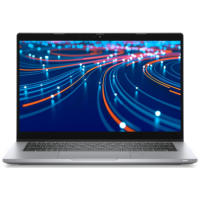



Excellent cosmetic condition - looks like new and saves you money.


Save money
Enjoy significant savings without compromising on quality.

Reduce waste
Reduce electronic waste and lower your carbon footprint.

Extensively tested
Every refurbished device is rigorously tested and repaired by certified technicians.
BSI Kitemark Certified
This device meets the BSI Kitemark™ certification standards, guaranteeing its quality and safety.

Warranty included
This device is protected with a warranty covering both parts and labour.
Smooth visuals
The Dell Latitude 5320 2-in-1 touchscreen laptop with a 13.3" FHD (1920 x 1080) display, video conferencing and streaming are crystal clear. This laptop is a great choice for your business and eliminates the worry that items are too heavy or not fit during your trip.
Large capacity with unlimited possibilities
The Dell Latitude 5320 2-in-1 laptop has 16GB of RAM to seamlessly run your applications as well as multiple programs and browser tabs all at once. This Dell laptop accesses files faster and has room for a large amount of files with the fast solid-state drive.
Experience Speed and Performance
Dell touchscreen laptop features a powerful Intel Core i5 11th gen processor. Dell Latitude complies with the fast and stable operation of most programs.
Multi-port response to high demand
The multiple ports of this Dell touchscreen laptop meet your various needs and in addition to working, you can also enjoy videos and music without any pressure on your computer.
Advanced Security
This 2-in-1 laptop with Windows 11 Pro installed provides more features and security options to help users better protect the security of personal and work data.
What's in the Box?
- Laptop
- Power adaptor
When setting up your new unit you will need to activate your Microsoft License Key. Follow the simple step by step guide to find out how to do so, it is really quick and easy to do!
How to activate your Microsoft License Key »