




Excellent cosmetic condition - looks like new and saves you money.


Save money
Enjoy significant savings without compromising on quality.

Reduce waste
Reduce electronic waste and lower your carbon footprint.

Extensively Tested
Every refurbished device is rigorously tested and repaired by certified technicians.

Warranty included
This device is protected with a warranty covering both parts and labour.
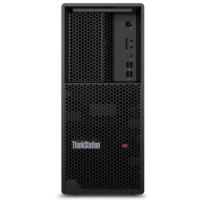
Designed by engineers for engineers, the Lenovo ThinkStation P3 Tower offers all the workhorse capabilities of a workstation for the price of a desktop. Built for tasks that require superior power and performance, it's equipped with Intel® Core™ processors with Intel vPro®, and supports professional NVIDIA® discrete graphics.
Delivering power & performance
The ThinkStation P3 Tower’s chassis has an advanced thermal design to promote extra power and performance, without overheating. It also comes with a choice of operating systems, including Windows 11 Pro and Linux®. In short, the P3 gives you the compute power to execute your visions, time and time again.
Configure it any which way
With three onboard DisplayPorts, plus the ability to configure up to eight more, the ThinkStation P3 Tower can support up to 12 independent displays. It also comes with a choice of operating systems, including Windows 11 Pro and Red Hat® Enterprise Linux®. And with heaps of speedy memory and SSD storage, plus five open PCIe slots, this workstation can be configured to tackle your most exacting workflows. It also comes with a USB mouse and keyboard.
Mission-critical performance, made easy
At the heart of every Lenovo ThinkStation is reliability. Proven to run in extreme conditions, the ThinkStation P3 Tower also boasts an array of independent software vendor (ISV) certifications. It's the perfect workstation for designers, engineers, and students looking for versatility, flexibility, and breakthrough performance to breeze through heavy workloads.
Security you can count on
The ThinkStation P3 Tower is protected with ThinkShield, a suite of hardware and software that work together to safeguard your workstation and data. This includes the discrete Trusted Platform Module (TPM) 2.0 to encrypt sensitive data, as well as various programs to prevent unauthorized access to the BIOS, plus self-healing software if the BIOS is corrupted or maliciously attacked. For extra peace of mind, it also supports Windows firmware updates.
Mission-critical performance, made easy
At the heart of every Lenovo ThinkStation is reliability. Proven to run in extreme conditions, the ThinkStation P3 Tower also boasts an array of independent software vendor (ISV) certifications. It's the perfect workstation for designers, engineers, and students looking for versatility, flexibility, and breakthrough performance to breeze through heavy workloads.
Security you can count on
The ThinkStation P3 Tower is protected with ThinkShield, a suite of hardware and software that work together to safeguard your workstation and data. This includes the discrete Trusted Platform Module (TPM) 2.0 to encrypt sensitive data, as well as various programs to prevent unauthorized access to the BIOS, plus self-healing software if the BIOS is corrupted or maliciously attacked. For extra peace of mind, it also supports Windows firmware updates.