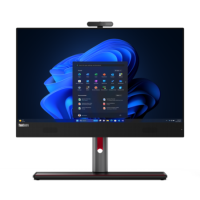








Excellent cosmetic condition - looks like new and saves you money.


Save money
Enjoy significant savings without compromising on quality.

Reduce waste
Reduce electronic waste and lower your carbon footprint.

Extensively Tested
Every refurbished device is rigorously tested and repaired by certified technicians.

Warranty included
This device is protected with a warranty covering both parts and labour.
Designed to brighten up any workspace
With its sleek design, the Lenovo ThinkCentre M90a Gen 5 all-in-one is a PC powerhouse. It runs on up to the Intel vPro® platform with 14th Gen Intel® Core™ processing muscle and boasts a stunning FHD display, with or without touchscreen. Plus, optional discrete graphics are ideal for video-editing or design work. Mounted on a choice of stands, including one that’s full function with adjustable tilt, lift, pivot, and swivel. And there’s even a docking space for your phone and keyboard to keep your workspace clutter-free.
A smarter way to work, by far
Thanks to our Intelligent Cooling Engine (ICE) 6.0, the ThinkCentre M90a Gen 5 all-in-one offers various power modes to meet your various computing needs. Choose a 15% power boost experience, a super quiet mode that cuts system noise by up to three decibels, or opt for maximum cooling. This cutting-edge PC also features optional smart human presence detection, enhancing both security and energy efficiency by recognizing when you're away from your machine.
Protecting your data, ideas, & more
Experience unparalleled peace of mind with ThinkShield, comprehensive security that comes with every ThinkCentre. The ThinkCentre M90a Gen 5 all-in-one PC leverages up to Intel vPro® for robust, hardware-enhanced device protection. Additional security measures include BIOS-based Smart USB Protection, and an optional physical shutter you can use to open and close the webcam, further safeguarding your privacy.
Because things happen
In addition to our stringent internal testing, the ThinkCentre M90a Gen 5 all-in-one PC has been evaluated against US Department of Defense's MIL-STD 810H standards and undergone more than 200 quality checks to confirm its ability to withstand extreme scenarios. These tests encompass a wide range of challenging factors, from the icy expanses of the Arctic tundra to dust-laden desert winds, including assessments for temperature, pressure, humidity, vibration, and beyond.
Built with the planet in mind
By 2025, Lenovo is committed to obtaining 90% of our global operations electricity from renewable sources, removing one-million tons of greenhouse gas emissions from our supply chain. It’s why this all-in-one PC, for instance, meets global standards for energy-efficiency and health & safety. And why it comes with 90% sustainable packaging and comprises recycled materials.Learn more about our environmental, social, and governance approach.