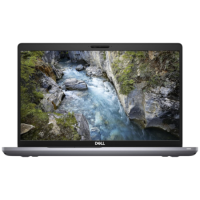





Very good condition - may display light cosmetic marks.


Save money
Enjoy significant savings without compromising on quality.

Reduce waste
Reduce electronic waste and lower your carbon footprint.

Extensively tested
Every refurbished device is rigorously tested and repaired by certified technicians.
BSI Kitemark Certified
This device meets the BSI Kitemark™ certification standards, guaranteeing its quality and safety.

Warranty included
This device is protected with a warranty covering both parts and labour.
Intelligent performance
Dell Optimizer for Precision uses built-in AI that learns how you use your system and applications, adjusting settings in the background to improve overall performance.
Bright ideas
Experience clarity and color with a Full HD display.
Maximum portability
Work will never weigh you down because this laptop is extremely light.
Get connected
Hookup all of your accessories with ports that include Thunderbolt, HDMI, USB and more.
Intelligent Audio
Dell Optimizer's Intelligent Audio will automatically tune your system by adjusting background noise, managing speech volume and refining overall sound experience so you can hear and be heard better wherever you work.
Precision, meet privacy
When you want to be heard but not seen, the camera shutter provides the privacy you want. Close the shutter to physically block the camera or open it when you want to video conference or take photos.
Dell Reliable Memory Technology Pro
Dell Reliable Memory Technology (RMT) Pro protects your work from potential crashes. Dell's exclusive RMT Pro works in conjunction with ECC memory to detect and correct memory errors.
What's In The Box?
- Laptop
- Power Adaptor
When setting up your new unit you will need to activate your Microsoft License Key. Follow the simple step by step guide to find out how to do so, it is really quick and easy to do!
How to activate your Microsoft License Key »