

















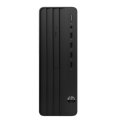



Excellent cosmetic condition - looks like new and saves you money.


Save money
Enjoy significant savings without compromising on quality.

Reduce waste
Reduce electronic waste and lower your carbon footprint.

Extensively tested
Every refurbished device is rigorously tested and repaired by certified technicians.
BSI Kitemark Certified
This device meets the BSI Kitemark™ certification standards, guaranteeing its quality and safety.

Warranty included
This device is protected with a warranty covering both parts and labour.
Compact Powerhouse with 8th Gen Intel Core i7
Don’t let its size fool you—the Lenovo ThinkCentre M720q Tiny is engineered to deliver exceptional performance in a small form factor. Equipped with an 8th generation Intel Core i7 processor, this desktop is built to handle demanding tasks with ease. From complex spreadsheets to multitasking across multiple applications, the M720q delivers swift, seamless performance ideal for both professional and home office environments.
Effortless Multitasking with 16GB RAM
With 16GB of high-speed DDR4 RAM, the M720q Tiny ensures fluid multitasking and faster access to frequently used applications and files. Whether you're running virtual meetings, handling large datasets, or using design software, the system keeps up without lag. This makes it an excellent choice for professionals who need to stay productive throughout the day.
Ample Storage with 512GB SSD
Boot up, load files, and launch programs in seconds thanks to the 512GB solid-state drive (SSD). Not only does this offer generous storage space for documents, media, and software, but it also significantly enhances overall system responsiveness. Enjoy quieter operation and greater reliability compared to traditional hard drives, ensuring your data is both secure and quickly accessible.
Designed for Windows 11 Pro
The ThinkCentre M720q Tiny comes preloaded with Windows 11 Pro, giving you access to a modern, streamlined interface and advanced productivity tools. Features like improved window management, enhanced security protocols, and seamless cloud integration support a more efficient workflow and better organization. It's built for the modern workforce and IT environments that demand reliability and control.
Space-Saving and Flexible Mounting Options
Measuring just a fraction of the size of a traditional desktop, the ThinkCentre M720q Tiny is designed to fit seamlessly into any workspace. It can be mounted behind a monitor, under a desk, or even on a wall—perfect for environments where space is at a premium. Its ultra-compact chassis allows for clutter-free setups without compromising on performance or connectivity.
When setting up your new unit you will need to activate your Microsoft License Key. Follow the simple step by step guide to find out how to do so, it is really quick and easy to do!
How to activate your Microsoft License Key »


