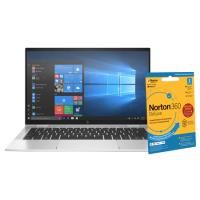






Very good condition - may display light cosmetic marks.


Save money
Enjoy significant savings without compromising on quality.

Reduce waste
Reduce electronic waste and lower your carbon footprint.

Extensively tested
Every refurbished device is rigorously tested and repaired by certified technicians.
BSI Kitemark Certified
This device meets the BSI Kitemark™ certification standards, guaranteeing its quality and safety.

Warranty included
This device is protected with a warranty covering both parts and labour.
Executive-Class Performance
Powered by a 10th Gen Intel® Core™ i7 processor, this laptop delivers seamless multitasking and responsive computing for demanding business workflows.
Ultra-Fast Memory & Storage
Equipped with 16GB RAM and a 512GB SSD, enjoy lightning-fast boot times, smooth application launches, and ample space for critical files and media.
Brilliant 13.3" Touchscreen Display
The Full HD touchscreen offers vivid visuals and intuitive interaction, perfect for presentations, design work, or hands-on productivity.
Convertible 2-in-1 Flexibility
Effortlessly switch between laptop, tablet, tent, and stand modes—ideal for mobile professionals who need versatility on the go.
Enterprise-Grade Security
With Windows 11 Pro, benefit from advanced security features like BitLocker encryption, remote desktop access, and seamless integration with corporate networks.
Ultra-Portable & Premium Build
Sleek, lightweight, and crafted with precision, the EliteBook x360 combines portability with durability—ready for boardrooms, flights, and fieldwork.
What's In The Box?
- Laptop
- Power Adaptor
When setting up your new unit you will need to activate your Microsoft License Key. Follow the simple step by step guide to find out how to do so, it is really quick and easy to do!
How to activate your Microsoft License Key »