












Appliances Direct
Laptops Direct
Drones Direct
Better Bathrooms
Furniture 123
Dehumidifiers
Outdoor Living
Aircon
Buying for Business?

Get sales advice from our team 7 days a week

0871 244 0934

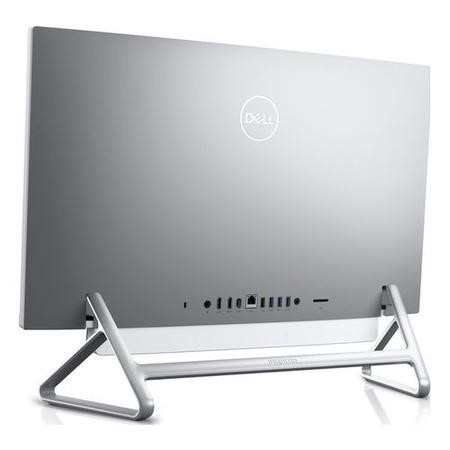
Refurbished Dell Inspiron 7700 Core i5-1135G7 8GB 512GB 27 Inch Windows 11 All in One

SKU: A2/3C7D9 Quickfind Code: 1793935
SAVE 22%

This product is no longer available.

Still need help?

For help finding something similar, just give us a call on 0871 244 0934*

* Calls cost 13p per min plus your network access charge

11th gen Intel Core i5 processor

The sleek and contemporary Dell Inspiron AIO 7700 27" All-in-One PC is not just a pretty face. Featuring a 11th gen Intel Core i5 processor, it can get some serious work done. Whether you're editing photos or surfing the web, you can expect a super smooth performance, even when you're multitasking.

Your entertainment, sorted

The big and bright InfinityEdge display is perfect for watching movies. With CinemaColor, you'll get vibrant colour and a crisp, sharp image to do your films justice. And when you want to listen to music, Waves Maxx Audio Pro ensures the Dell Inspiron AIO sounds as good as it looks.

Keep your privacy

You won't be seen when you don't want to. The HD webcam pops up when you want to use it and hides away when you don't. So there's nothing to worry about when you've finished video calling your friends and family.


Some devices may come with Windows 11 pre installed, but some may need manually updating to the latest version of Windows from Windows 10, 10S or 11S. It's easy and free to do in just 3 easy steps. Find out how by clicking here »

How To Easily Update Your Windows Laptop

Some devices may come with Windows 11 pre installed, but some may need manually updating to the latest version of Windows from Windows 10, 10S or 11S. It's easy and free to do in just 3 easy steps.

Windows 11 the most productive and secure version of windows yet with easy Navigation, easy organisation and faster performance. Windows 11 has all the power and security of past Windows verisions but with a redesigned and refrshed look. With new tools, sounds and apps that all come together to bring a new refreshing Windows experience.

1. Settings > On your device Select the start button, then click on settings.

2. Updates & Security > Click on Updates & Security.

3. Windows Update > Select check for updates. If updates are available, click instal to get the latest version of Windows.


You may also like

Recently viewed


Back to top